 Japan eSIM | DJB
 South Korea eSIM | DJB
 Thailand eSIM | DJB
 Americas eSIM | DJB
 Americas eSIM | DJB
 Philippines eSIM | DJB


Mobile technology keeps evolving, and SIM cards have moved from traditional physical cards to the compact, convenient eSIM. As the technology has matured, every smartphone now carries its own "identity codes" too — IMEI and EID. These are not just long strings of numbers; they are your phone's unique identifiers in the world of mobile networks. Want to know what they are, what they are used for, and where to find them? Keep reading!
IMEI
Full name: International Mobile Equipment Identity
Length/format: 15 digits (the first 14 identify the device, the 15th is a check digit)
Dual-SIM phones always have IMEI1/IMEI2
[What it's used for]
- A globally unique identifier that lets mobile networks recognise the device
- Can be used to blacklist a device if reported stolen
- Stays the same when you swap SIM cards (it only changes if the motherboard is replaced)
[How to find your IMEI]
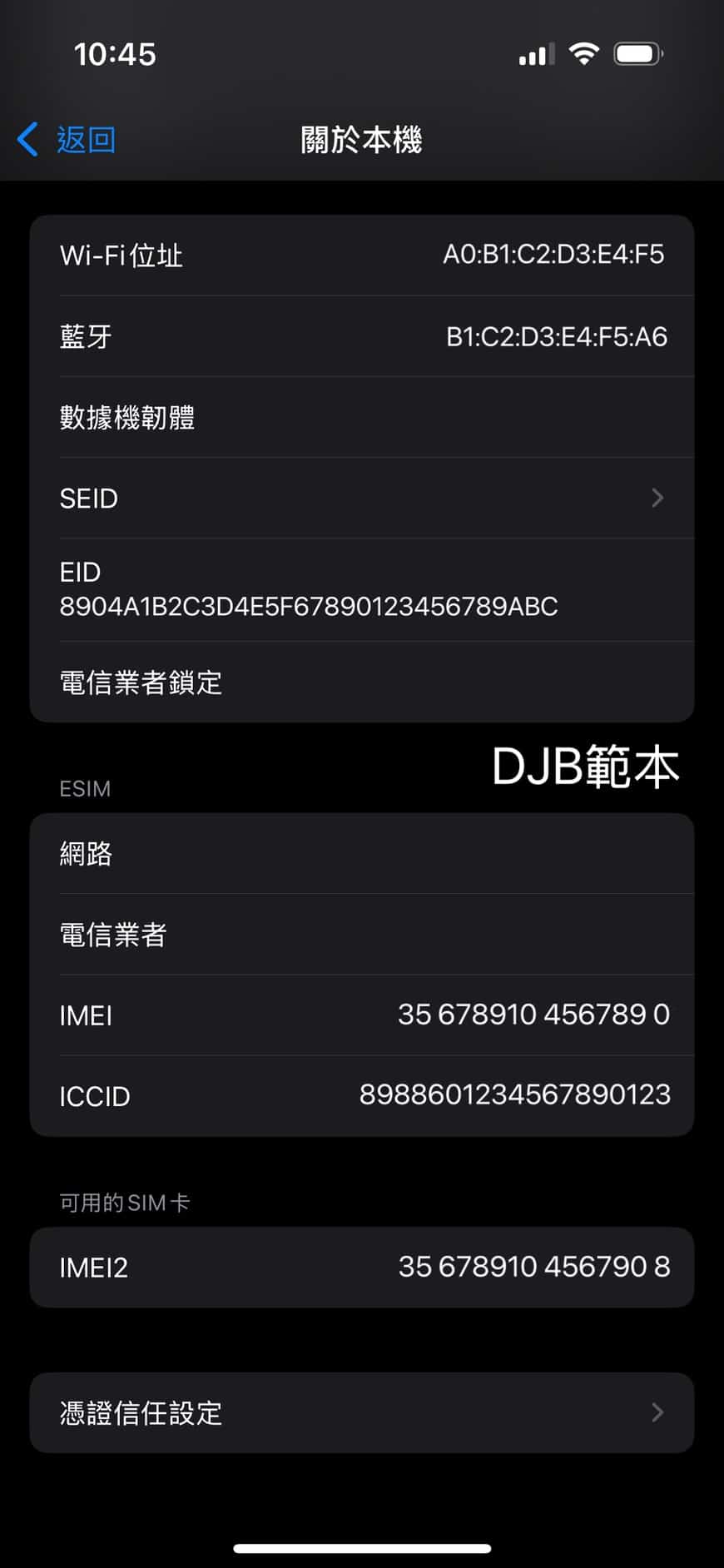
- iPhone: Settings → General → About → IMEI / IMEI2 (dual-SIM phones show two)
- Android: Settings → About phone → Status → IMEI
- Universal method: dial *#06# on the keypad → the IMEI pops up instantly
EID
Full name: Embedded Identity Document
Length/format: 32 characters (hexadecimal, digits 0–9 and letters A–F)
[What it's used for]
- A unique serial number for eSIM, used to bind and activate an eSIM within the carrier's system
- Every eSIM-capable device has an EID
[How to find your EID]
- iPhone: Settings → General → About → EID (only shown on eSIM-capable devices)
- Android (Pixel / Samsung / other eSIM-capable models): Settings → About phone → Status information → EID
- On some phones: dialling *#06# also displays the EID (eSIM-capable devices only)
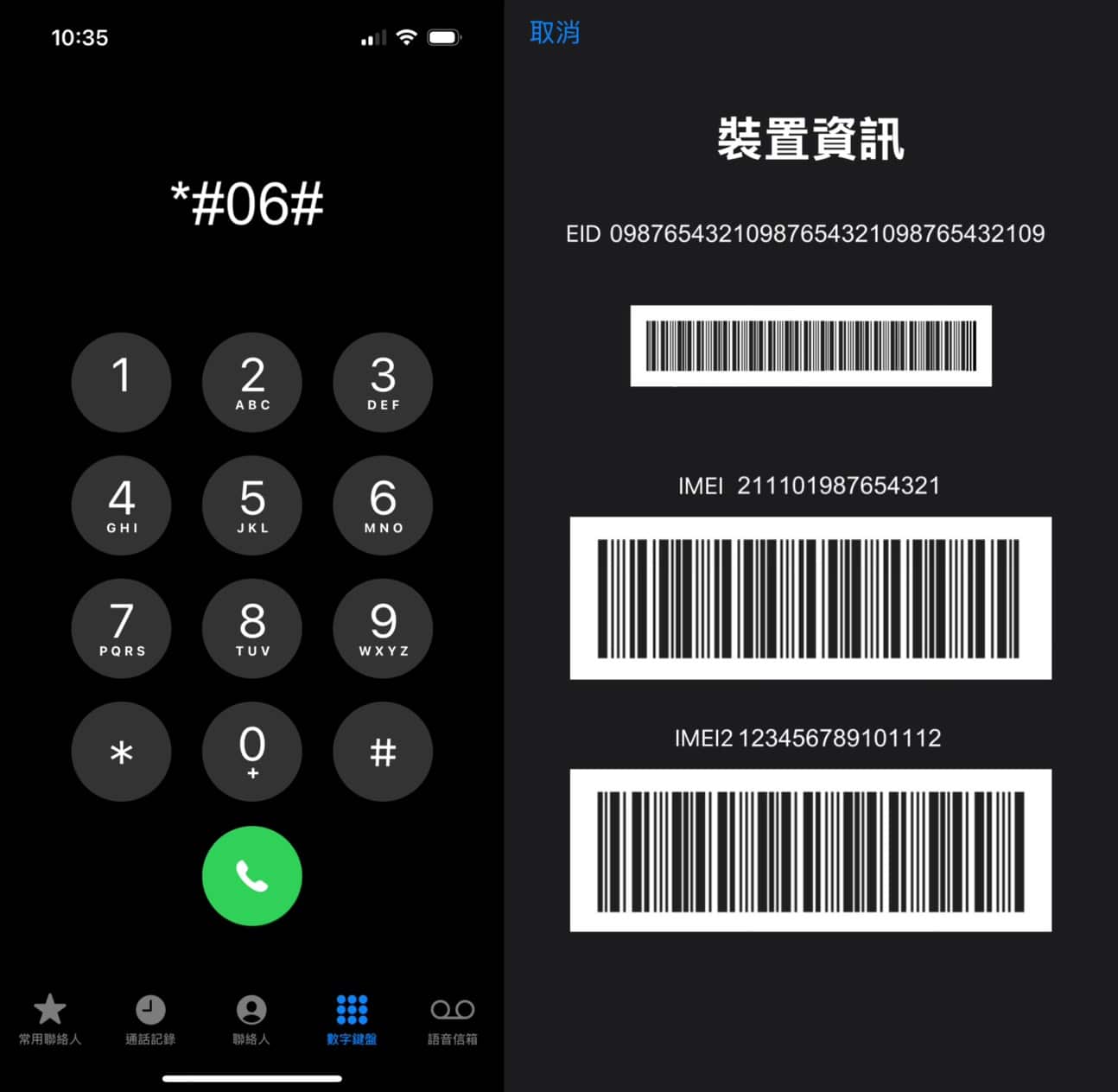
EID vs. IMEI: what's the difference?
Both EID and IMEI are unique identifiers for your phone, but they serve different purposes. EID is specific to eSIM, letting a carrier activate or bind a data plan; IMEI applies to every mobile device, identifying the hardware itself. The table below breaks down the differences in purpose, what each identifies, how each relates to service, and format, so you can tell them apart at a glance.
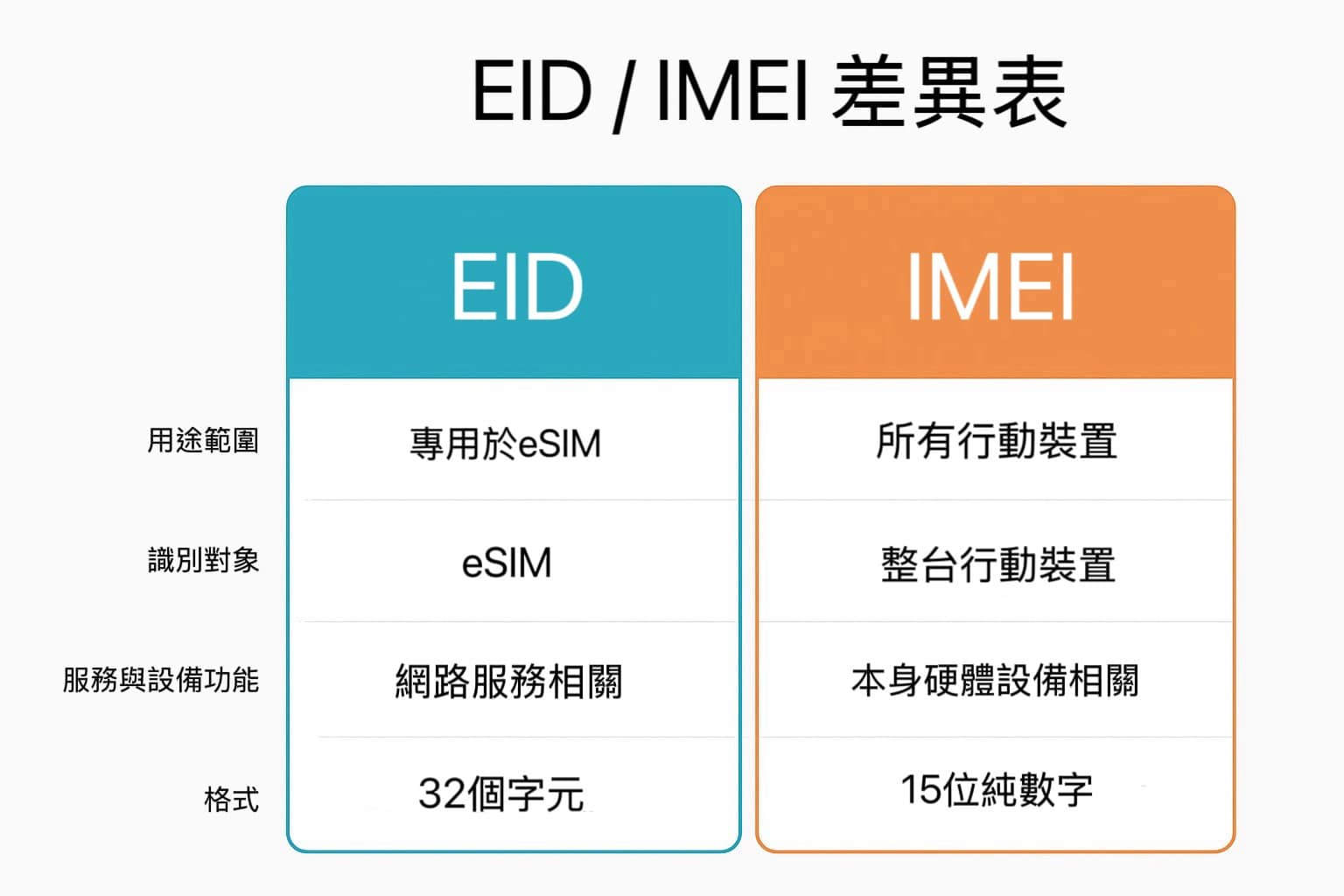
- Scope
- EID: a unique identifier used specifically for eSIM (Embedded SIM), for activating and binding an eSIM profile in the carrier's system.
- IMEI: applies to all mobile devices (both physical SIM and eSIM), letting the mobile network identify the device itself.
- What it identifies
- EID: identifies the "eSIM chip"
- IMEI: identifies the "entire mobile device"
- Relation to service and device function
- EID: mainly tied to activating network service and downloading/binding eSIM data
- IMEI: mainly tied to device identity, anti-theft blacklisting, and network access approval
- Format
- EID: 32 hexadecimal characters (0–9, A–F)
- IMEI: 15 digits (the first 14 identify the device, the 15th is a check digit)
- What they have in common
- Both are globally unique identifiers
- Both can be found in phone settings or by dialling
*#06#(though EID only appears on eSIM-capable devices)
Other similar identifiers
We have also rounded up other common identifiers found on phones — ICCID, MEID, Serial Number, Wi-Fi MAC address, and Bluetooth address — along with what each is used for and where to find them on iPhone and Android. The numbers in the table below are just examples, not real usable codes — they are only there to show the format.
| Name | Format | Purpose | Where to find it on iPhone | Where to find it on Android |
| ICCID | 19–20 digits | Unique SIM card number (physical or eSIM) | Settings → General → About → ICCID | Settings → About phone → Status information → SIM card status / ICCID |
| MEID | 14 digits or 16 hexadecimal characters | Device identifier for CDMA networks (US / parts of Asia) | Settings → General → About → MEID | Settings → About phone → Status information → MEID |
| Serial Number | Alphanumeric (variable length) | Manufacturing serial number, used for warranty, repairs, and device verification | Settings → General → About → Serial Number | Settings → About phone → Serial number |
| Wi-Fi MAC address | 12 hexadecimal characters (e.g. A0:B1:C2:D3:E4:F5) | Wi-Fi hardware identifier | Settings → Wi-Fi → select current network → Wi-Fi Address | Settings → Wi-Fi → select current network → MAC address |
| Bluetooth address | 12 hexadecimal characters | Bluetooth hardware identifier | Settings → General → About → Bluetooth | Settings → About phone → Bluetooth address |
Comments are closed for this article.
Comments (0)